If the file that you are trying to upload to the Ordering Portal is too large, you will receive an error message. The file will not be able to rip to the presses for printing if it cannot be uploaded to the Ordering Portal. The file will need to be reduced in size in order to upload.
File Size Error Message
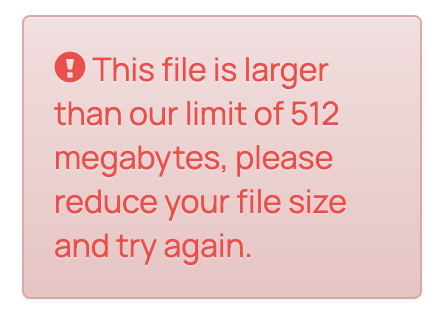
The maximum file size that the Ordering Portal will accept is 512MB. If the file is larger then this, you will receive an error message that looks like this:
Troubleshooting Reducing File Size
Files with intricate artwork, lots of layers, or large numbers of pages can get pretty large. If your file is over 512MB, here are some ways you can reduce your file size without compromising the artwork:
- Rasterize the file - If you haven’t already, we recommend rasterizing the artwork within the file. Make sure the raster settings had a resolution of at least 300PPI. This will preserve the print quality and should help in reducing the file size.
- Flatten the file - Flattening your file can merge complex elements within your file to help reduce file size.
- TIFF the file - As another option, you can export the file as a TIFF and upload it into the ordering portal. Note: TIFF files are set in the RGB color space. Color variances are more likely when we print from a file that is not in CMYK.
Related Articles:
Was this article helpful?
That’s Great!
Thank you for your feedback
Sorry! We couldn't be helpful
Thank you for your feedback
Feedback sent
We appreciate your effort and will try to fix the article