Color plays a crucial role in how your printed stationery is perceived, but what you see on your screen isn’t always what you’ll get on paper. Because digital designs use light-based color (RGB) and printing relies on ink (CMYK), some variation is inevitable. Since PrintsWell doesn't offer color matching services, it’s important to understand how colors translate from screen to print so you can know what to expect on your printed pieces.

RGB/HEX vs. CMYK
RGB (Red, Green, Blue) is used for digital screens like phones, tablets, and computers. Colors are created using light, which makes them appear bright and vibrant. HEX (hexadecimal) codes are another format for defining the same Red, Green, and Blue values used on screens.
CMYK (Cyan, Magenta, Yellow, Black) is used for printing. Colors are created using ink on paper, which naturally produces a more muted appearance.
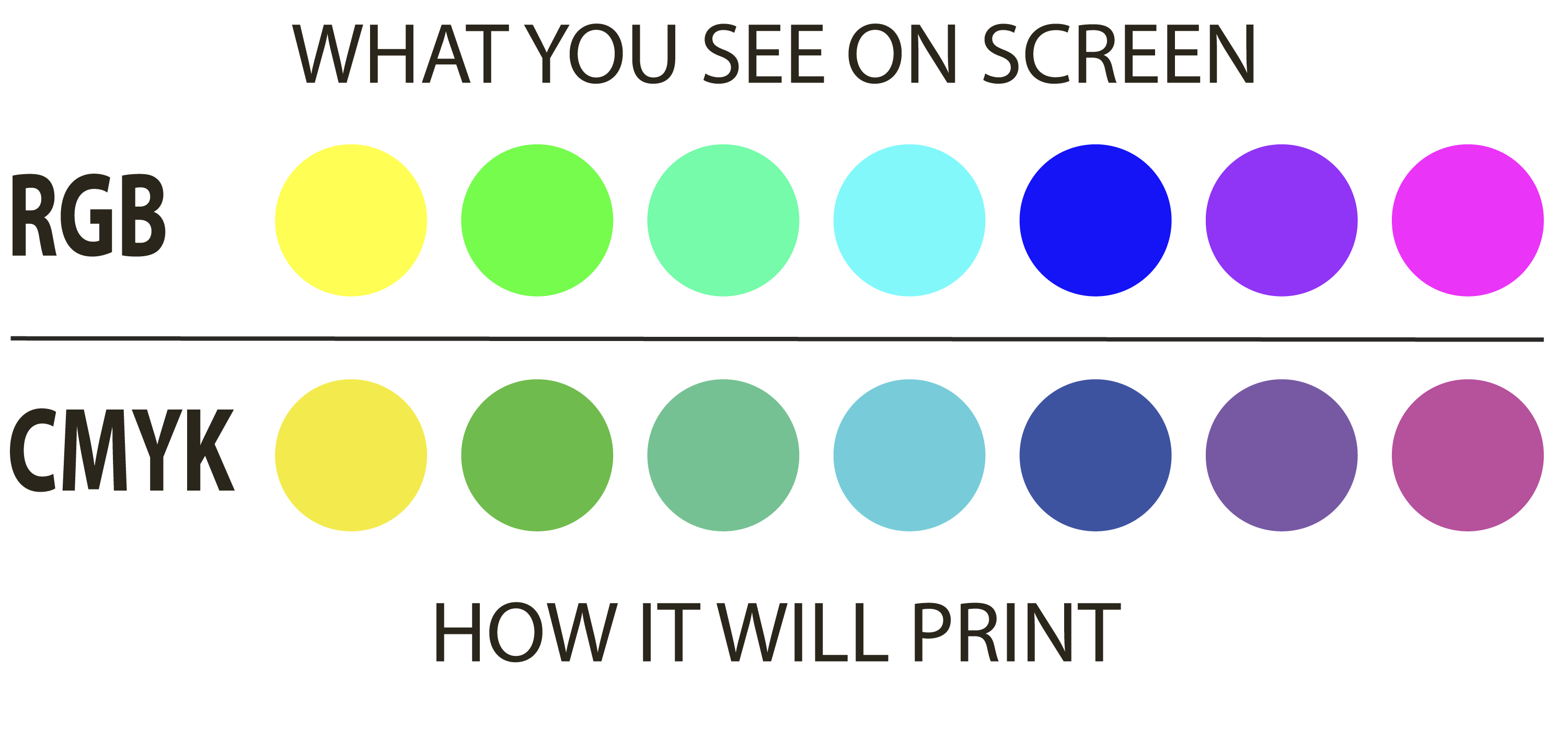
Why Colors Look Different in Print
If your printed piece doesn’t match what you see on screen, that’s completely normal. CMYK on screen can look different once printed. Here’s why:
Screens Are Backlit
Digital screens emit light, making colors appear brighter and more saturated than they will in print.
Ink and Paper Affect Color
Printed stationery typically uses matte inks on matte or textured papers , which absorb light instead of emitting it. This naturally softens and subdues colors.
Color Shifts Between Color Spaces Are Expected
Because RGB and CMYK use different color systems, some color shifting will occur when converting from screen to print. Bright or neon colors in RGB cannot always be reproduced exactly in CMYK.
How to Set Up Color in Your File
To ensure the best possible print outcome, follow these setup guidelines:
Use CMYK Color Mode
Set your document color space to CMYK before designing. Canva Users: see note below.
Use Whole CMYK Values
When entering colors, use clean, whole-number CMYK values to maintain consistency. (example: C=0, M=50, Y=100, K=0)
Convert Images to CMYK
Before placing images into your file, make sure they are converted from RGB to CMYK. This helps avoid unexpected color shifts during printing.
For Canva
You will need to design in HEX color, then convert to CMYK when exporting. Check to be sure the colors in the exported PDF aren't drastically different from the colors in your original design.
By understanding the differences between RGB and CMYK, and setting up your files correctly, you can avoid unexpected color shifts and achieve more reliable print results. While some variation between screen and print is normal, following these best practices will help ensure your final stationery pieces look polished, consistent, and true to your design intent.
Related Articles:
Was this article helpful?
That’s Great!
Thank you for your feedback
Sorry! We couldn't be helpful
Thank you for your feedback
Feedback sent
We appreciate your effort and will try to fix the article